


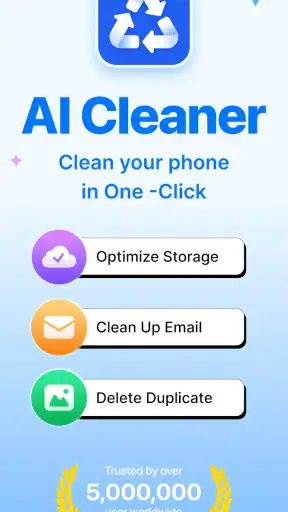
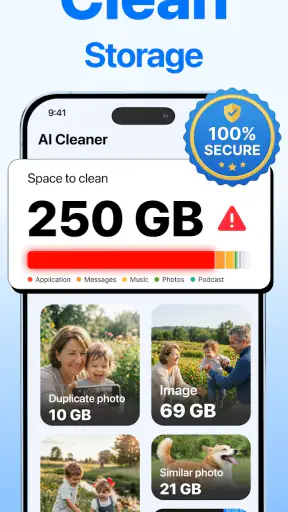
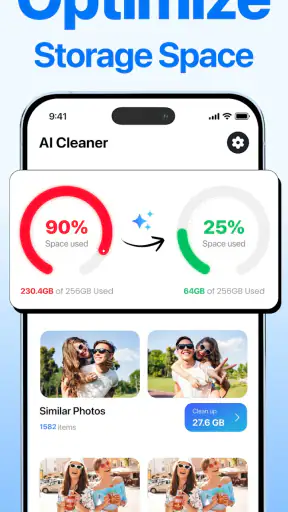


I installed AI Cleaner: Clean up Storage expecting a quick way to reclaim space, but the more interesting question turned out to be whether it could become part of a sensible phone-maintenance routine. Its promise is straightforward: help identify junk, duplicate photos, and large files so I can decide what deserves to stay. That makes it a Tools app rather than a replacement for a full file manager, photo library, or backup service.
My first impression was positive because the purpose is easy to understand. When a phone starts warning about low storage, browsing folders manually is rarely appealing. A focused cleaning app can turn that vague problem into a list of possible removals. The important word is “possible,” though. I would not treat any cleaner as an automatic permission slip to erase files. The useful part is the sorting and highlighting; the final decision still belongs to me.
Developed by iKame Applications - Begamob Global, the app is free to install and is suitable for Everyone. It runs on Android 9 or later, and the current version is 1.2.5. Its store summary focuses on clearing junk, duplicate photos, and large files, which gives the app a narrower and more practical identity than utilities that claim to solve every phone problem at once.
What makes the first week appealing
During the first week, a storage cleaner has an obvious advantage: it gives me a reason to look at files I normally ignore. Screenshots, repeated downloads, old videos, and forgotten media can quietly occupy a phone for months. Even without changing my habits, a review session can reveal why storage is disappearing. That discovery is often more valuable than the deletion itself.
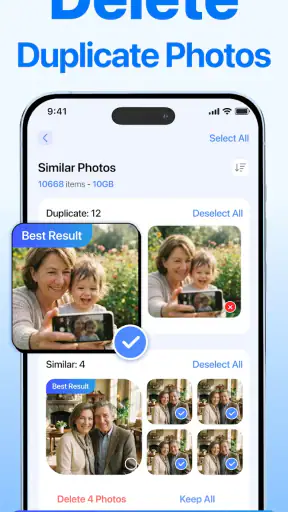
The duplicate-photo angle is especially relevant for people who take several versions of the same picture. I often keep a burst of nearly identical images because choosing the best one feels like a chore. A dedicated review flow can make that task less intimidating, provided I inspect the suggested groups rather than accepting them blindly. Similar-looking photos are not always interchangeable: one may have a better expression, a sharper focus, or a detail that matters later.
Large-file discovery is useful in a different way. A long video or an old offline download can matter more than dozens of tiny items. I prefer starting with the biggest candidates, then asking three questions: do I still need it, is it backed up somewhere I trust, and could I obtain it again if necessary? This approach reduces the chance of spending time on small, low-impact deletions while overlooking the files that actually solve the storage problem.
A practical first-week scenario would be preparing for travel. Before downloading maps, playlists, or shows, I could use the app to examine old recordings and duplicate photos. The best workflow is not “scan, select everything, delete.” It is “scan, sort the candidates by personal value, confirm backups, then remove only what I recognize.” That habit makes the tool safer and more useful than a dramatic one-tap cleanup.
The app’s popularity also makes it easy to understand why people are trying it. It has an average rating of 4.4 from around 38 thousand ratings and more than 5 million installs. Those figures suggest broad interest in the problem it addresses, but they do not remove the need for personal judgment. Storage is private, and a cleaner is only as trustworthy as the review process I use before confirming an action.
Where the AI label helps, and where it does not
The “AI Cleaner” short description creates an expectation that the app will recognize useful patterns rather than merely list folders. That can be helpful when duplicate images are hard to spot manually. Still, I would not assume that an automated suggestion understands the emotional or practical value of every file. A photo may look repetitive but belong to a family event, a work record, or a visual reference I deliberately saved.
My advice is to use intelligent suggestions as a shortlist, not as a verdict. For photos, compare the proposed items at full size before removing anything. For large files, check the filename and location, then open the item when its identity is unclear. For junk, be particularly careful with anything whose purpose is not obvious. The small amount of extra attention is worthwhile because recovering a deleted personal file may be difficult or impossible.
Three workflows that make the tool more useful
First, I would separate “space recovery” from “digital housekeeping.” If I urgently need room, I would begin with large files and obvious duplicates. If I am doing a calm monthly review, I would spend more time on screenshots and repeated images. Mixing both goals can make a session feel endless and encourages careless selections.
Second, I would use a two-pass method for photo cleanup. On the first pass, I would remove only exact or clearly redundant copies. On the second, I would review near-duplicates with more care. This trade-off matters because aggressive photo cleanup saves more space but increases the risk of deleting a meaningful variation. The app can help surface the candidates, but it cannot replace my knowledge of why I kept them.
Third, I would make a short “do not touch yet” group mentally before starting. That includes recent work files, travel documents, family media, and anything not backed up. This sounds simple, but it prevents the common mistake of treating every large or repeated file as disposable. A cleaner works best when it supports a personal rule rather than becoming the rule.
Month-to-month value depends on a small routine
The first cleanup is usually the most satisfying because accumulated clutter is visible. The harder test is whether the app remains useful after the obvious files are gone. In my view, its lasting value depends on a light recurring routine rather than frequent deep scans. A short review every few weeks is more realistic than waiting until the phone is nearly full.
For month-to-month use, I would focus on new clutter categories. Screenshots from temporary tasks, duplicate images from messaging, and downloaded videos tend to return even after a successful first cleanup. The app becomes more valuable when I use it as a checkpoint for these habits instead of expecting one session to permanently solve storage.
There is also a behavioral benefit. Seeing how quickly certain categories grow can change what I do elsewhere. I may stop saving several versions of the same image, remove downloads after finishing a trip, or move important recordings to a deliberate archive. In that sense, the app’s strongest recurring contribution may be awareness. It helps turn storage from an invisible background problem into something I occasionally manage.
However, not every month will produce a dramatic result. If I already use careful photo organization and rarely download large media, repeated scans may show little worth deleting. That is not necessarily a failure. A maintenance tool should sometimes confirm that there is nothing urgent to clean. The mistake would be judging its value only by how many files it removes each time.
The free price lowers the barrier to trying this routine, but the presence of in-app purchases ranging from $6.99 to $49.99 per item means I would pay attention to what is offered before committing money. I would first establish whether the free experience fits my needs and whether I actually use the app repeatedly. A subscription-like or premium decision makes more sense after a month of real use than during a stressful low-storage warning.
How it compares with ordinary alternatives
The built-in storage tools on Android are often the better choice for someone who wants the fewest moving parts. They are already part of the phone experience, and they may be enough for checking broad storage categories or removing familiar downloads. I would choose the system tools when I only need a quick overview and already know where my clutter lives.
A dedicated gallery app can be preferable for people whose main problem is photo organization. Gallery-focused tools usually fit naturally into the process of choosing favorites, albums, and memories. AI Cleaner: Clean up Storage makes more sense when photos are only one part of the issue and I also want to investigate large files and general junk in the same cleaning session.
A file manager remains the stronger option for users who want precise control. It lets me inspect folders, rename items, move archives, and understand where data is stored. That control takes more effort, while a cleaner is more approachable for a quick candidate list. The trade-off is that convenience can hide context, so I would use a file manager when a deletion has consequences or the app’s suggestion is unclear.
Cloud storage and external backups solve a different problem. They preserve files instead of simply removing them. If my real concern is protecting family photos or work documents, I would back them up first and use a cleaner afterward. This app should not be treated as a backup strategy. Its role is deciding what can leave the device, not guaranteeing that important content exists elsewhere.
The maintenance burden and the points of fatigue
The main maintenance burden is review time. A scan may make cleanup look easy, but careful selection still requires attention. Duplicate photos can be visually similar without being identical, and large files can be large for a good reason. If the app presents many suggestions, the convenience of discovery can be offset by the effort needed to verify them.
Another possible source of fatigue is repetition. The first session feels productive; later sessions may surface the same types of clutter or only minor savings. I would avoid opening the app every day. That turns a useful utility into another notification-driven chore. A scheduled personal habit, such as checking storage before a trip or at the end of a busy photo period, feels more sustainable.
Commercial prompts can also affect the experience. Because paid items are available, I would read each screen carefully and avoid tapping through a cleanup flow automatically. This is not a criticism unique to this app; it is simply good practice for any free utility that offers optional purchases. The product earns trust when I can understand what action is free, what action costs money, and what will happen before I confirm it.
Privacy is another reason to slow down. Cleaning photos and files involves highly personal material, so I would only use the app when I am comfortable reviewing those categories on the device. I would also avoid assuming that an automated classification is perfect merely because it uses AI language. The safest pattern is local, deliberate inspection: identify a candidate, open or verify it, then delete only when its status is clear.
There is a subtle maintenance trade-off between maximum free space and a comfortable library. If I delete every temporary image, I may save room but lose useful references. If I keep everything, the phone becomes harder to search and eventually runs short on capacity. I prefer a middle path: remove clear duplicates and finished downloads, preserve meaningful originals, and archive important material before cleaning aggressively.
Who will appreciate it, and who should skip it
I think this app is a good fit for people who regularly receive photos and videos, keep several versions of images, or dislike navigating storage folders. It is also useful for someone who wants a guided starting point after a low-storage warning. The app’s focused categories make the first investigation less overwhelming than opening a file manager with no idea where to begin.
I would be more cautious recommending it to a meticulous file organizer who already has a reliable folder system. That person may prefer the transparency and control of built-in tools or a full file manager. I would also skip it as a primary solution if my biggest need is photo backup, cross-device synchronization, or document archiving. Cleaning and preserving are related tasks, but they are not the same task.
Families sharing a phone should take extra care. A duplicate that looks unimportant to one person may belong to someone else, and a large file may be needed for school, work, or an upcoming event. In that situation, I would review items with the owner before deletion. The app can make candidates easier to find, but it cannot know who has final authority over them.
Does it earn lasting space?
After the novelty fades, I see AI Cleaner: Clean up Storage as a useful maintenance assistant rather than an app I would keep open constantly. Its lasting value comes from reducing the friction of finding duplicates, junk, and oversized files. It is most convincing when I have a specific storage problem and want a guided shortlist instead of manually exploring every location.
Its limitations are equally important. Automated suggestions need human verification, repeated cleanups may become less rewarding, and paid options deserve a careful look before purchase. The app will not replace backups, a gallery organizer, or a precise file manager. Anyone expecting a single scan to permanently prevent storage problems will probably be disappointed.
For me, the best long-term approach would be occasional use tied to real moments: before a trip, after a period of heavy photo taking, or when storage begins to feel tight. I would start with obvious duplicates and large files, protect anything important through backup, and leave uncertain items alone. That routine keeps the app from becoming another source of digital clutter.
With an Everyone rating, Android support beginning at version 9, a free entry point, and a current version of 1.2.5, it is accessible to a broad range of users. The developer, iKame Applications - Begamob Global, has positioned it around a familiar problem rather than an elaborate set of unrelated tools. My recommendation is positive for guided storage cleanup, but conditional: use it as a careful review companion, not as an automatic delete button.
If your phone is crowded with repeated photos and forgotten large files, I think it is worth trying and judging after a few weeks of normal use. If your storage is already organized or your priority is secure backup, another tool will serve you better. The app earns lasting space on my own device only when it saves me decision-making time without asking me to surrender decision-making itself.


